Pinterest Image Downloader
Download Pinterest Pictures in Full Quality Without Watermark
How to use Pinterest Image Downloader
Pinsave is an online platform that allows you to effortlessly download images from Pinterest. Fetch Pinterest images or photos in stunning HD JPG quality using the Pinterest photo downloader.
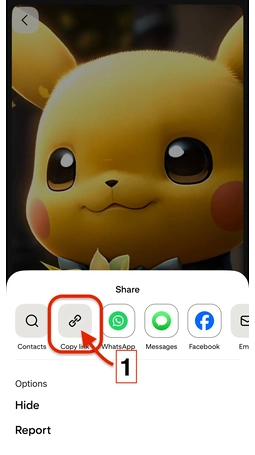
Copy Image URL
Copy the Pinterest Image URL you want to download

Paste The Links
Simply copy the Image link from Pinterest, paste it into the field, and click on Download.

Download Image
Click on the Download button to get started.
Pinterest Image Downloader
Pinterest is an amazing website that is used by millions of people around the world daily. People live to explore images in almost every category, from clothing to sport, and ideas and inspiration of every kind. With over 478 million monthly active users, Pinterest is an amazing source to find lovely pins and images. However, Pinterest does not allow users to save images directly to their devices.To counter this problem, our platform Pinsave.org allows you to save a publicly available image. In just a few clicks, you can download images in High Quality without any watermark. It's a life-saving tool for you if your work relies on images. Whether you're a designer collecting images for inspiration, a blogger looking for featured images, or just someone who wants to save beautiful pictures, our tool makes the process effortless.
Why You Need a Pinterest Image Downloader
Pinterest only gives you an option to save your favourite images within Pinterest, but doesn't allow you to save them on your device. This limitation can be frustrating when you want to download images to your device.
Taking screenshots of Pinterest images can result in blurred or low-quality images also which will look very unprofessional.
Instead of searching for other options and wasting time and effort you can easily download images within a minute.
How to Download Pinterest Images with Pinsave.org
Our tool functionality is simple and user-friendly. Here's how it works:
- Open Pinterest
- Find the pin you want to download
- Click the three dots (...) in the top right corner
- Select "Copy link" or "Share link"
- Open your web browser
- Go to https://Pinsave.org
- Paste the Pinterest URL in the download box
- Click the "Download" button
- Choose your image quality
- Save the image to your device
The entire process takes less than 20 seconds from start to finish!
Benefits of Using Our Pinterest Image Downloader
- For Content Creators
- For Bloggers and Marketers
- For Personal Use
- For Educators and Students
Pinsave's Journey of Success and Performance
Top Features of Pinsave.org
That is why our Pinterest Video Downloader is loved by thousands