Pinterest Video Downloader
Download Pinterest video, images and GIFs in high quality Instantly
How to Download Pinterest Videos Using Pinsave.org
Our Pinterest video downloader lets you easily grab videos in top-notch quality, like Full HD, 2K, and 4K MP4. Whether you’re on your phone, tablet, or laptop, saving your favorite Pinterest videos is a breeze. No software needed here; just copy the link and download right from your browser.
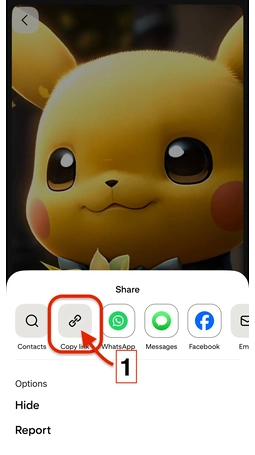
Copy Video URL
Copy the Pinterest video URL you want to download

Paste The Links
Simply copy the video link from Pinterest, paste it into the field, and click on Download.

Download Video
Click on the Download button to get started.
Pinterest Video Downloader
Pinterest is one of the most popular websites for watching popular videos online, with content including cooking recipes, DIY videos, fashion tips, and holiday ideas. But let's say that you find an amazing video that you want to save to watch later? But, Pinterest doesn't have an option to download Pinterest videos.
That's where we Pinsave.org come in! Our free Pinterest Video Downloader is incredibly easy to use to download any Pinterest video to your computer or phone with just a few easy clicks. No difficult steps, no registration, and no watermarks—just speedy, high-quality downloads!
Why Do You Need a Pinterest Video Download?
Pinterest is full of informative and humorous videos, but they don't have the option to save videos to watch later. That's why Pinsave.org is the best solution: Save videos to watch later offline.
Now you will not miss any content even if it's deleted later on from Pinterest, you have it downloaded on your computer. You can share this video easily with your friends or family WhatsApp groups, or you can also reshare it on your social profiles very easily.
Pinsave.org allows you to save video in HD quality, now you don't have to do a screen recording in a low-quality frame.
How to download a pinterest video using Pinsave.org
The process of downloading Pinterest videos through Pinsave.org requires only basic steps. The following steps will guide you through the process of video downloading with our tool:
Step 1: Look for the Video on Pinterest find the video you want to download. Select "Copy link" from the three dots that appear on the video.
Step 2: Go to Pinsave.org
Step 3: Paste the Link & Download Insert the Pinterest video link into the download box.
Step 4: Your video will be provided in HD quality. Click on "Download MP4" to download it onto your device. It's done! You can now watch the video whenever and even offline.
Pinsave's Journey of Success and Performance
Top Features of Pinsave.org
That is why our Pinterest Video Downloader is loved by thousands
Pinterest Video Downloader – Pinsave FAQs
Looking for a simple way to save Pinterest videos? Pinsave makes it quick and easy to download your favorite clips in high quality. We've answered common questions about Pinsave, including its functionality, supported formats, mobile use, and safety. This guide will walk you through everything you need to know so you can download videos hassle-free.